Tuning the hyperparameters of a neural network using EasyVVUQ and FabSim3
In this tutorial we will use the EasyVVUQ GridSampler to perform a grid search on the hyperparameters of a simple Keras neural network model, trained to recognize hand-written digits. This is the famous MNIST data set, of which 4 input features (of size 28 x 28) are show below. These are fed into a standard feed-forward neural network, which will predict the label 0-9.
The (Keras) neural network script is located in mnist/keras_mnist.template, which will form the input template for the EasyVVUQ encoder. We will assume you are familiar with the basic EasyVVUQ building blocks. If not, you can look at the basic tutorial.
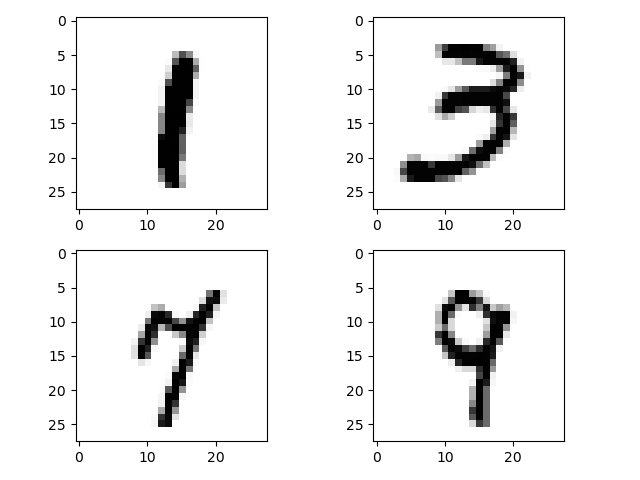
We need EasyVVUQ, TensorFlow and the TensorFlow data sets to execute this tutorial. If you need to install these, uncomment the corresponding line below.
[1]:
# !pip install easyvvuq
!pip install tensorflow
!pip install tensorflow_datasets
Requirement already satisfied: tensorflow in /home/wouter/anaconda3/lib/python3.9/site-packages (2.11.0)
Requirement already satisfied: absl-py>=1.0.0 in /home/wouter/anaconda3/lib/python3.9/site-packages (from tensorflow) (1.4.0)
Requirement already satisfied: astunparse>=1.6.0 in /home/wouter/anaconda3/lib/python3.9/site-packages (from tensorflow) (1.6.3)
Requirement already satisfied: flatbuffers>=2.0 in /home/wouter/anaconda3/lib/python3.9/site-packages (from tensorflow) (2.0)
Requirement already satisfied: gast<=0.4.0,>=0.2.1 in /home/wouter/anaconda3/lib/python3.9/site-packages (from tensorflow) (0.4.0)
Requirement already satisfied: google-pasta>=0.1.1 in /home/wouter/anaconda3/lib/python3.9/site-packages (from tensorflow) (0.2.0)
Requirement already satisfied: h5py>=2.9.0 in /home/wouter/anaconda3/lib/python3.9/site-packages (from tensorflow) (3.9.0)
Requirement already satisfied: libclang>=13.0.0 in /home/wouter/anaconda3/lib/python3.9/site-packages (from tensorflow) (18.1.1)
Requirement already satisfied: numpy>=1.20 in /home/wouter/anaconda3/lib/python3.9/site-packages (from tensorflow) (1.24.3)
Requirement already satisfied: opt-einsum>=2.3.2 in /home/wouter/anaconda3/lib/python3.9/site-packages (from tensorflow) (3.3.0)
Requirement already satisfied: packaging in /home/wouter/anaconda3/lib/python3.9/site-packages (from tensorflow) (23.1)
Collecting protobuf<3.20,>=3.9.2 (from tensorflow)
  Using cached protobuf-3.19.6-cp39-cp39-manylinux_2_17_x86_64.manylinux2014_x86_64.whl.metadata (787 bytes)
Requirement already satisfied: setuptools in /home/wouter/anaconda3/lib/python3.9/site-packages (from tensorflow) (68.0.0)
Requirement already satisfied: six>=1.12.0 in /home/wouter/anaconda3/lib/python3.9/site-packages (from tensorflow) (1.16.0)
Requirement already satisfied: termcolor>=1.1.0 in /home/wouter/anaconda3/lib/python3.9/site-packages (from tensorflow) (2.1.0)
Requirement already satisfied: typing-extensions>=3.6.6 in /home/wouter/anaconda3/lib/python3.9/site-packages (from tensorflow) (4.7.1)
Requirement already satisfied: wrapt>=1.11.0 in /home/wouter/anaconda3/lib/python3.9/site-packages (from tensorflow) (1.14.1)
Requirement already satisfied: grpcio<2.0,>=1.24.3 in /home/wouter/anaconda3/lib/python3.9/site-packages (from tensorflow) (1.42.0)
Requirement already satisfied: tensorboard<2.12,>=2.11 in /home/wouter/anaconda3/lib/python3.9/site-packages (from tensorflow) (2.11.0)
Requirement already satisfied: tensorflow-estimator<2.12,>=2.11.0 in /home/wouter/anaconda3/lib/python3.9/site-packages (from tensorflow) (2.11.0)
Requirement already satisfied: keras<2.12,>=2.11.0 in /home/wouter/anaconda3/lib/python3.9/site-packages (from tensorflow) (2.11.0)
Requirement already satisfied: tensorflow-io-gcs-filesystem>=0.23.1 in /home/wouter/anaconda3/lib/python3.9/site-packages (from tensorflow) (0.37.1)
Requirement already satisfied: wheel<1.0,>=0.23.0 in /home/wouter/anaconda3/lib/python3.9/site-packages (from astunparse>=1.6.0->tensorflow) (0.41.2)
Requirement already satisfied: google-auth<3,>=1.6.3 in /home/wouter/anaconda3/lib/python3.9/site-packages (from tensorboard<2.12,>=2.11->tensorflow) (2.22.0)
Requirement already satisfied: google-auth-oauthlib<0.5,>=0.4.1 in /home/wouter/anaconda3/lib/python3.9/site-packages (from tensorboard<2.12,>=2.11->tensorflow) (0.4.4)
Requirement already satisfied: markdown>=2.6.8 in /home/wouter/anaconda3/lib/python3.9/site-packages (from tensorboard<2.12,>=2.11->tensorflow) (3.4.1)
Requirement already satisfied: requests<3,>=2.21.0 in /home/wouter/anaconda3/lib/python3.9/site-packages (from tensorboard<2.12,>=2.11->tensorflow) (2.31.0)
Requirement already satisfied: tensorboard-data-server<0.7.0,>=0.6.0 in /home/wouter/anaconda3/lib/python3.9/site-packages (from tensorboard<2.12,>=2.11->tensorflow) (0.6.1)
Requirement already satisfied: tensorboard-plugin-wit>=1.6.0 in /home/wouter/anaconda3/lib/python3.9/site-packages (from tensorboard<2.12,>=2.11->tensorflow) (1.8.1)
Requirement already satisfied: werkzeug>=1.0.1 in /home/wouter/anaconda3/lib/python3.9/site-packages (from tensorboard<2.12,>=2.11->tensorflow) (2.2.3)
Requirement already satisfied: cachetools<6.0,>=2.0.0 in /home/wouter/.local/lib/python3.9/site-packages/cachetools-5.3.0-py3.9.egg (from google-auth<3,>=1.6.3->tensorboard<2.12,>=2.11->tensorflow) (5.3.0)
Requirement already satisfied: pyasn1-modules>=0.2.1 in /home/wouter/.local/lib/python3.9/site-packages/pyasn1_modules-0.3.0rc1-py3.9.egg (from google-auth<3,>=1.6.3->tensorboard<2.12,>=2.11->tensorflow) (0.3.0rc1)
Requirement already satisfied: rsa<5,>=3.1.4 in /home/wouter/.local/lib/python3.9/site-packages/rsa-4.9-py3.9.egg (from google-auth<3,>=1.6.3->tensorboard<2.12,>=2.11->tensorflow) (4.9)
Requirement already satisfied: urllib3<2.0 in /home/wouter/anaconda3/lib/python3.9/site-packages (from google-auth<3,>=1.6.3->tensorboard<2.12,>=2.11->tensorflow) (1.26.18)
Requirement already satisfied: requests-oauthlib>=0.7.0 in /home/wouter/.local/lib/python3.9/site-packages/requests_oauthlib-1.3.1-py3.9.egg (from google-auth-oauthlib<0.5,>=0.4.1->tensorboard<2.12,>=2.11->tensorflow) (1.3.1)
Requirement already satisfied: importlib-metadata>=4.4 in /home/wouter/anaconda3/lib/python3.9/site-packages (from markdown>=2.6.8->tensorboard<2.12,>=2.11->tensorflow) (6.0.0)
Requirement already satisfied: charset-normalizer<4,>=2 in /home/wouter/anaconda3/lib/python3.9/site-packages (from requests<3,>=2.21.0->tensorboard<2.12,>=2.11->tensorflow) (2.0.4)
Requirement already satisfied: idna<4,>=2.5 in /home/wouter/anaconda3/lib/python3.9/site-packages (from requests<3,>=2.21.0->tensorboard<2.12,>=2.11->tensorflow) (3.4)
Requirement already satisfied: certifi>=2017.4.17 in /home/wouter/anaconda3/lib/python3.9/site-packages (from requests<3,>=2.21.0->tensorboard<2.12,>=2.11->tensorflow) (2024.2.2)
Requirement already satisfied: MarkupSafe>=2.1.1 in /home/wouter/anaconda3/lib/python3.9/site-packages (from werkzeug>=1.0.1->tensorboard<2.12,>=2.11->tensorflow) (2.1.1)
Requirement already satisfied: zipp>=0.5 in /home/wouter/anaconda3/lib/python3.9/site-packages (from importlib-metadata>=4.4->markdown>=2.6.8->tensorboard<2.12,>=2.11->tensorflow) (3.11.0)
Requirement already satisfied: pyasn1<0.6.0,>=0.4.6 in /home/wouter/anaconda3/lib/python3.9/site-packages (from pyasn1-modules>=0.2.1->google-auth<3,>=1.6.3->tensorboard<2.12,>=2.11->tensorflow) (0.4.8)
Requirement already satisfied: oauthlib>=3.0.0 in /home/wouter/.local/lib/python3.9/site-packages/oauthlib-3.2.2-py3.9.egg (from requests-oauthlib>=0.7.0->google-auth-oauthlib<0.5,>=0.4.1->tensorboard<2.12,>=2.11->tensorflow) (3.2.2)
Using cached protobuf-3.19.6-cp39-cp39-manylinux_2_17_x86_64.manylinux2014_x86_64.whl (1.1 MB)
Installing collected packages: protobuf
  Attempting uninstall: protobuf
    Found existing installation: protobuf 3.20.3
    Uninstalling protobuf-3.20.3:
      Successfully uninstalled protobuf-3.20.3
ERROR: pip's dependency resolver does not currently take into account all the packages that are installed. This behaviour is the source of the following dependency conflicts.
tensorflow-datasets 4.9.3 requires protobuf>=3.20, but you have protobuf 3.19.6 which is incompatible.
tensorflow-metadata 1.15.0 requires protobuf<4.21,>=3.20.3; python_version < "3.11", but you have protobuf 3.19.6 which is incompatible.
Successfully installed protobuf-3.19.6
WARNING: There was an error checking the latest version of pip.
Requirement already satisfied: tensorflow_datasets in /home/wouter/anaconda3/lib/python3.9/site-packages (4.9.3)
Requirement already satisfied: absl-py in /home/wouter/anaconda3/lib/python3.9/site-packages (from tensorflow_datasets) (1.4.0)
Requirement already satisfied: array-record in /home/wouter/anaconda3/lib/python3.9/site-packages (from tensorflow_datasets) (0.5.1)
Requirement already satisfied: click in /home/wouter/anaconda3/lib/python3.9/site-packages (from tensorflow_datasets) (8.1.7)
Requirement already satisfied: dm-tree in /home/wouter/anaconda3/lib/python3.9/site-packages (from tensorflow_datasets) (0.1.8)
Requirement already satisfied: etils>=0.9.0 in /home/wouter/anaconda3/lib/python3.9/site-packages (from etils[enp,epath,etree]>=0.9.0->tensorflow_datasets) (1.5.2)
Requirement already satisfied: numpy in /home/wouter/anaconda3/lib/python3.9/site-packages (from tensorflow_datasets) (1.24.3)
Requirement already satisfied: promise in /home/wouter/anaconda3/lib/python3.9/site-packages (from tensorflow_datasets) (2.3)
Collecting protobuf>=3.20 (from tensorflow_datasets)
  Using cached protobuf-5.28.2-cp38-abi3-manylinux2014_x86_64.whl.metadata (592 bytes)
Requirement already satisfied: psutil in /home/wouter/anaconda3/lib/python3.9/site-packages (from tensorflow_datasets) (5.9.0)
Requirement already satisfied: requests>=2.19.0 in /home/wouter/anaconda3/lib/python3.9/site-packages (from tensorflow_datasets) (2.31.0)
Requirement already satisfied: tensorflow-metadata in /home/wouter/anaconda3/lib/python3.9/site-packages (from tensorflow_datasets) (1.15.0)
Requirement already satisfied: termcolor in /home/wouter/anaconda3/lib/python3.9/site-packages (from tensorflow_datasets) (2.1.0)
Requirement already satisfied: toml in /home/wouter/anaconda3/lib/python3.9/site-packages (from tensorflow_datasets) (0.10.2)
Requirement already satisfied: tqdm in /home/wouter/anaconda3/lib/python3.9/site-packages (from tensorflow_datasets) (4.65.0)
Requirement already satisfied: wrapt in /home/wouter/anaconda3/lib/python3.9/site-packages (from tensorflow_datasets) (1.14.1)
Requirement already satisfied: fsspec in /home/wouter/anaconda3/lib/python3.9/site-packages (from etils[enp,epath,etree]>=0.9.0->tensorflow_datasets) (2023.4.0)
Requirement already satisfied: importlib_resources in /home/wouter/anaconda3/lib/python3.9/site-packages (from etils[enp,epath,etree]>=0.9.0->tensorflow_datasets) (6.1.0)
Requirement already satisfied: typing_extensions in /home/wouter/anaconda3/lib/python3.9/site-packages (from etils[enp,epath,etree]>=0.9.0->tensorflow_datasets) (4.7.1)
Requirement already satisfied: zipp in /home/wouter/anaconda3/lib/python3.9/site-packages (from etils[enp,epath,etree]>=0.9.0->tensorflow_datasets) (3.11.0)
Requirement already satisfied: charset-normalizer<4,>=2 in /home/wouter/anaconda3/lib/python3.9/site-packages (from requests>=2.19.0->tensorflow_datasets) (2.0.4)
Requirement already satisfied: idna<4,>=2.5 in /home/wouter/anaconda3/lib/python3.9/site-packages (from requests>=2.19.0->tensorflow_datasets) (3.4)
Requirement already satisfied: urllib3<3,>=1.21.1 in /home/wouter/anaconda3/lib/python3.9/site-packages (from requests>=2.19.0->tensorflow_datasets) (1.26.18)
Requirement already satisfied: certifi>=2017.4.17 in /home/wouter/anaconda3/lib/python3.9/site-packages (from requests>=2.19.0->tensorflow_datasets) (2024.2.2)
Requirement already satisfied: six in /home/wouter/anaconda3/lib/python3.9/site-packages (from promise->tensorflow_datasets) (1.16.0)
  Using cached protobuf-3.20.3-cp39-cp39-manylinux_2_5_x86_64.manylinux1_x86_64.whl.metadata (679 bytes)
Using cached protobuf-3.20.3-cp39-cp39-manylinux_2_5_x86_64.manylinux1_x86_64.whl (1.0 MB)
Installing collected packages: protobuf
  Attempting uninstall: protobuf
    Found existing installation: protobuf 3.19.6
    Uninstalling protobuf-3.19.6:
      Successfully uninstalled protobuf-3.19.6
ERROR: pip's dependency resolver does not currently take into account all the packages that are installed. This behaviour is the source of the following dependency conflicts.
tensorflow 2.11.0 requires protobuf<3.20,>=3.9.2, but you have protobuf 3.20.3 which is incompatible.
Successfully installed protobuf-3.20.3
WARNING: There was an error checking the latest version of pip.
FabSim3
While running on the localhost, we will use the FabSim3 automation toolkit for the data processing workflow, i.e. to move the UQ ensemble to/from the localhost. To connect EasyVVUQ with FabSim3, the FabUQCampaign plugin must be installed.
The advantage of this construction is that we could offload the ensemble to a remote supercomputer using this same script by simply changing the MACHINE='localhost' flag, provided that FabSIm3 is set up on the remote resource.
For an example without FabSim3, see tutorials/hyperparameter_tuning_tutorial.ipynb.
For now, import the required libraries below. fabsim3_cmd_api is an interface with fabSim3 such that the command-line FabSim3 commands can be executed in a Python script. It is stored locally in fabsim3_cmd_api.py.
[2]:
import easyvvuq as uq
import os
import numpy as np

############################################
# Import the FabSim3 commandline interface #
############################################
import fabsim3_cmd_api as fab
/home/wouter/anaconda3/lib/python3.9/site-packages/paramiko/transport.py:219: CryptographyDeprecationWarning: Blowfish has been deprecated
  "class": algorithms.Blowfish,
We now set some flags:
[3]:
# Work directory, where the EasyVVUQ directory will be placed
WORK_DIR = '/tmp'
# machine to run ensemble on
MACHINE = "localhost"
# target output filename generated by the code
TARGET_FILENAME = 'output.csv'
# EasyVVUQ campaign name
CAMPAIGN_NAME = 'grid_test'

# FabSim3 config name
CONFIG = 'grid_search'
# Use QCG PilotJob or not
PILOT_JOB = False
Most of these are self explanatory. Here, CONFIG is the name of the script that gets executed for each sample, in this case grid_search, which is located in FabUQCampaign/templates/grid_search. Its contents are essentially just runs our Python code hyper_param_tune.py:
cd $job_results
$run_prefix

/usr/bin/env > env.log

python3 hyper_param_tune.py
Here, hyper_param_tune is generated by the EasyVVUQ encoder, see below. The flag PILOT_JOB regulates the use of the QCG PilotJob mechanism. If True, FabSim will submit the ensemble to the (remote) host as a QCG PilotJob, which essentially means that all invididual jobs of the ensemble will get packaged into a single job allocation, thereby circumventing the limit on the maximum number of simultaneous jobs that is present on many supercomputers. For more info on the QCG PilotJob click
here. In this example we’ll run the samples on the localhost (see MACHINE), and hence we set PILOT_JOB=False.
As is standard in EasyVVUQ, we now define the parameter space. In this case these are 4 hyperparameters. There is one hidden layer with n_neurons neurons, a Dropout layer after the input and hidden layer, with dropout probability dropout_prob_in and dropout_prob_hidden respectively. We made the learning_rate tuneable as well.
[4]:
params = {}
params["n_neurons"] = {"type":"integer", "default": 32}
params["dropout_prob_in"] = {"type":"float", "default": 0.0}
params["dropout_prob_hidden"] = {"type":"float", "default": 0.0}
params["learning_rate"] = {"type":"float", "default": 0.001}
These 4 hyperparameter appear as flags in the input template mnist/keras_mnist.template. Typically this is generated from an input file used by some simualtion code. In this case however, mnist/keras_mnist.template is directly our Python script, with the hyperparameters replaced by flags. For instance:
model = tf.keras.models.Sequential([
  tf.keras.layers.Flatten(input_shape=(28, 28)),
  tf.keras.layers.Dropout($dropout_prob_in),
  tf.keras.layers.Dense($n_neurons, activation='relu'),
  tf.keras.layers.Dropout($dropout_prob_hidden),
  tf.keras.layers.Dense(10)
])
is simply the neural network construction part with flags for the dropout probabilities and the number of neurons in the hidden layer. The encoder reads the flags and replaces them with numeric values, and it subsequently writes the corresponding target_filename=hyper_param_tune.py:
[5]:
encoder = uq.encoders.GenericEncoder('./mnist/keras_mnist.template', target_filename='hyper_param_tune.py')
Now we create the first set of EasyVVUQ actions to create separate run directories and to encode the template:
[6]:
# actions: create directories and encode input template, placing 1 hyper_param_tune.py file in each directory.
actions = uq.actions.Actions(
    uq.actions.CreateRunDirectory(root=WORK_DIR, flatten=True),
    uq.actions.Encode(encoder),
)

# create the EasyVVUQ main campaign object
campaign = uq.Campaign(
    name=CAMPAIGN_NAME,
    work_dir=WORK_DIR,
)

# add the param definitions and actions to the campaign
campaign.add_app(
    name=CAMPAIGN_NAME,
    params=params,
    actions=actions
)
As with the uncertainty-quantification (UQ) samplers, the vary is used to select which of the params we actually vary. Unlike the UQ samplers we do not specify an input probability distribution. This being a grid search, we simply specify a list of values for each hyperparameter. Parameters not in vary, but with a flag in the template, will be given the default value specified in params.
[7]:
vary = {"n_neurons": [64, 128], "learning_rate": [0.005, 0.01, 0.015]}
Note: we are mixing integer and floats in the vary dict. Other data types (string, boolean) can also be used.
The vary dict is passed to the Grid_Sampler. As can be seen, it created a tensor product of all 1D points specified in vary. If a single tensor product is not useful (e.g. because it creates combinations of parameters that do not makes sense), you can also pass a list of different vary dicts. For even more flexibility you can also write the required parameter combinations to a CSV file, and pass it to the CSV_Sampler instead.
[8]:
# create an instance of the Grid Sampler
sampler = uq.sampling.Grid_Sampler(vary)

# Associate the sampler with the campaign
campaign.set_sampler(sampler)

# print the points
print("There are %d points:" % (sampler.n_samples()))
sampler.points
There are 6 points:
[8]:
[array([[64, 0.005],
        [64, 0.01],
        [64, 0.015],
        [128, 0.005],
        [128, 0.01],
        [128, 0.015]], dtype=object)]
Run the actions (create directories with hyper_param_tune.py files in it)
[9]:
###############################
# execute the defined actions #
###############################

campaign.execute().collate()
To run the ensemble, execute:
[10]:
###################################################
# run the UQ ensemble using the FabSim3 interface #
###################################################

fab.run_uq_ensemble(CONFIG, campaign.campaign_dir, script='grid_search',
                    machine=MACHINE, PJ=PILOT_JOB)

# wait for job to complete
fab.wait(machine=MACHINE)
Executing fabsim localhost run_uq_ensemble:grid_search,campaign_dir=/tmp/grid_test9hb35tv6,script=grid_search,skip=0,PJ=False
/home/wouter/anaconda3/lib/python3.9/site-packages/paramiko/transport.py:219: CryptographyDeprecationWarning: Blowfish has been deprecated
  "class": algorithms.Blowfish,
Traceback (most recent call last):
  File "/home/wouter/VECMA/FabSim/results/grid_search_localhost_16/RUNS/run_6/hyper_param_tune.py", line 7, in <module>
    import tensorflow as tf
ModuleNotFoundError: No module named 'tensorflow'
Traceback (most recent call last):
  File "/home/wouter/VECMA/FabSim3/fabsim/bin/fabsim", line 46, in <module>
    sys.exit(fabsim_main.main())
  File "/home/wouter/VECMA/FabSim3/fabsim/base/fabsim_main.py", line 162, in main
    env.exec_func(*env.task_args, **env.task_kwargs)
  File "/home/wouter/VECMA/FabSim3/fabsim/base/decorators.py", line 75, in wrapper
    return func(*args, **kwargs)
  File "/home/wouter/VECMA/FabSim3/plugins/FabUQCampaign/FabUQCampaign.py", line 67, in run_uq_ensemble
    uq_ensemble(config, script, **args)
  File "/home/wouter/VECMA/FabSim3/fabsim/base/decorators.py", line 75, in wrapper
    return func(*args, **kwargs)
  File "/home/wouter/VECMA/FabSim3/plugins/FabUQCampaign/FabUQCampaign.py", line 38, in uq_ensemble
    run_ensemble(config, sweep_dir, **args)
  File "<@beartype(fabsim.base.fab.run_ensemble) at 0x7584fd9758b0>", line 134, in run_ensemble
  File "/home/wouter/VECMA/FabSim3/fabsim/base/fab.py", line 1252, in run_ensemble
    job_scripts_to_submit = job(
  File "/home/wouter/VECMA/FabSim3/fabsim/base/fab.py", line 705, in job
    job_submission(dict(job_script=job_script))
  File "/home/wouter/VECMA/FabSim3/fabsim/base/fab.py", line 1037, in job_submission
    run(
  File "<@beartype(fabsim.base.networks.run) at 0x7584fda13670>", line 77, in run
  File "/home/wouter/VECMA/FabSim3/fabsim/base/networks.py", line 146, in run
    return manual(cmd, cd=cd, capture=capture)
  File "<@beartype(fabsim.base.networks.manual) at 0x7584fda13c10>", line 77, in manual
  File "/home/wouter/VECMA/FabSim3/fabsim/base/networks.py", line 209, in manual
    return local(pre_cmd + "'" + manual_command + "'", capture=capture)
  File "<@beartype(fabsim.base.networks.local) at 0x7584feab5f70>", line 54, in local
  File "/home/wouter/VECMA/FabSim3/fabsim/base/networks.py", line 55, in local
    raise RuntimeError(
RuntimeError:
local() encountered an error (return code 1)while executing 'ssh -Y -p 22 wouter@lh ' /home/wouter/VECMA/FabSim/results/grid_search_localhost_16/RUNS/run_6/grid_search_localhost_16_run_6.sh''
[10]:
True
[11]:
# check if all output files are retrieved from the remote machine, returns a Boolean flag
all_good = fab.verify(CONFIG, campaign.campaign_dir, TARGET_FILENAME, machine=MACHINE)
Executing fabsim localhost fetch_results
/home/wouter/anaconda3/lib/python3.9/site-packages/paramiko/transport.py:219: CryptographyDeprecationWarning: Blowfish has been deprecated
  "class": algorithms.Blowfish,
Executing fabsim localhost verify_last_ensemble:grid_search,campaign_dir=/tmp/grid_test9hb35tv6,target_filename=output.csv,machine=localhost
/home/wouter/anaconda3/lib/python3.9/site-packages/paramiko/transport.py:219: CryptographyDeprecationWarning: Blowfish has been deprecated
  "class": algorithms.Blowfish,
[12]:
if all_good:
    # copy the results from the FabSim results dir to the EasyVVUQ results dir
    fab.get_uq_samples(CONFIG, campaign.campaign_dir, sampler.n_samples(), machine=MACHINE)
else:
    print("Not all samples executed correctly")
    import sys
    sys.exit()
Not all samples executed correctly
An exception has occurred, use %tb to see the full traceback.

SystemExit
/home/wouter/anaconda3/lib/python3.9/site-packages/IPython/core/interactiveshell.py:3534: UserWarning: To exit: use 'exit', 'quit', or Ctrl-D.
  warn("To exit: use 'exit', 'quit', or Ctrl-D.", stacklevel=1)
Briely:
fab.run_uq_ensemble: this command submits the ensemble to the (remote) host for execution. Under the hood it uses the FabSim3campaign2ensemblesubroutine to copy the run directories fromWORK_DIRto the FabSim3SWEEPdirectory, located inconfig_files/grid_search/SWEEP. From there the ensemble will be sent to the (remote) host.fab.wait: this will check every minute on the status of the jobs on the remote host, and sleep otherwise, halting further execution of the script. On the localhost this command doesn’t do anything.fab.verify: this will execute theverify_last_ensemblesubroutine to see if the output filetarget_filenamefor each run in theSWEEPdirectory is present in the corresponding FabSim3 results directory. Returns a boolean flag.fab.verifywill also call the FabSimfetch_resultsmethod, which actually retreives the results from the (remote) host. So, if you want to just get the results without verifying the presence of output files, callfab.fetch_results(machine=MACHINE)instead. However, if something went wrong on the (remote) host, this will cause an error later on since not all required output files will be transfered on the EasyVVUQWORK_DIR.fab.get_uq_samples: copies the samples from the (local) FabSim results directory to the (local) EasyVVUQ campaign directory. It will not delete the results from the FabSim results directory. If you want to save space, you can delete the results on the FabSim side (seeresultsdirectory in your FabSim home directory). You can also callfab.clear_results(machine, name_results_dir)to remove a specific FabSim results directory on a given machine.
Error handling
If all_good == False something went wrong on the (remote) host, and sys.exit() is called in our example, giving you the opportunity of investigating what went wrong. It can happen that a (small) number of jobs did not get executed on the remote host for some reason, whereas (most) jobs did execute succesfully. In this case simply resubmitting the failed jobs could be an option:
fab.remove_succesful_runs(CONFIG, campaign.campaign_dir)
fab.resubmit_previous_ensemble(CONFIG, 'grid_search')
The first command removes all succesful run directories from the SWEEP dir for which the output file TARGET_FILENAME has been found. For this to work, fab.verify must have been called. Then, fab.resubmit_previous_ensemble simply resubmits the runs that are present in the SWEEP directory, which by now only contains the failed runs. After the jobs have finished, call fab.verify again to see if now TARGET_FILENAME is present in the results directory, for every run in the
SWEEP dir.
Once we are sure we have all required output files, the role of FabSim is over, and we proceed with decoding the output files. In this case, our Python script wrote the training and test accuracy to a CSV file, hence we use the SimpleCSV decoder.
Note: It is also possible to use a more flexible HDF5 format, by using uq.decoders.HDF5 instead.
[ ]:
#############################################
# All output files are present, decode them #
#############################################
output_columns = ["accuracy_train", "accuracy_test"]

decoder = uq.decoders.SimpleCSV(
    target_filename=TARGET_FILENAME,
    output_columns=output_columns)

actions = uq.actions.Actions(
    uq.actions.Decode(decoder),
)

campaign.replace_actions(CAMPAIGN_NAME, actions)

###########################
# Execute decoding action #
###########################

campaign.execute().collate()

data_frame = campaign.get_collation_result()
data_frame
Display the hyperparameters with the maximum test accuracy
[ ]:
print("Best hyperparameters with %.2f%% test accuracy:" % (data_frame['accuracy_test'].max().values * 100,))
data_frame.loc[data_frame['accuracy_test'].idxmax()][vary.keys()]
Executing a grid search on a remote host
To run the example script on a remote host, a number of changes must be made. Ensure the remote host is defined in machines.yml in your FabSim3 directory, as well as the user login information. Assuming we’ll run the ensemble on the Eagle super computer at the Poznan Supercomputing and Networking Center , the entry in machines_user.yml could look similar to the following:
eagle_vecma:
  username: "<your_username>"
  home_path_template: "/tmp/lustre/<your_username>"
  budget: "plgvecma2021"
  cores: 1
  # job wall time for each job, format Days-Hours:Minutes:Seconds
  job_wall_time : "0-0:59:00" # job wall time for each single job without PJ
  PJ_size : "1" # number of requested nodes for PJ
  PJ_wall_time : "0-00:59:00" # job wall time for PJ
  modules:
    loaded: ["python/3.7.3"]
    unloaded: []
Here:
home_path_template: the remote root directory for FabSim3, such that for instance the results on the remote machine will be stored inhome_path_template/FabSim3/results.budget: the name of the computational budget that you are allowed to use.cores: the number of cores to use per run. Our simple Keras script justs need a single core, but applications which already have some built-in paralellism will require more cores.job_wall_time: a time limit per run, and without the use of the QCG PilotJob framework.PJ_size: the number of nodes, in the case with the use of the QCG PilotJob framework.PJ_wall_time: a total time limit, and with the use of the QCG PilotJob framework.
To automatically setup the ssh keys, and prevent having to login manually for every random sample, run the following from the command line:
fabsim eagle_vecma setup_ssh_keys
Once the remote machine is properly setup, we can just set:
# Use QCG PilotJob or not
PILOT_JOB = False
# machine to run ensemble on
MACHINE = "eagle_vecma"
If you now re-run the example script, the ensemble will execute on the remote host, submitting each run as a separate job. By setting PILOT_JOB=True, all runs will be packaged in a single job.
[ ]: